
The Super Widget brings Local Lifestyle, Demographics, Community Highlights, and Crime into one tabbed address-level experience.
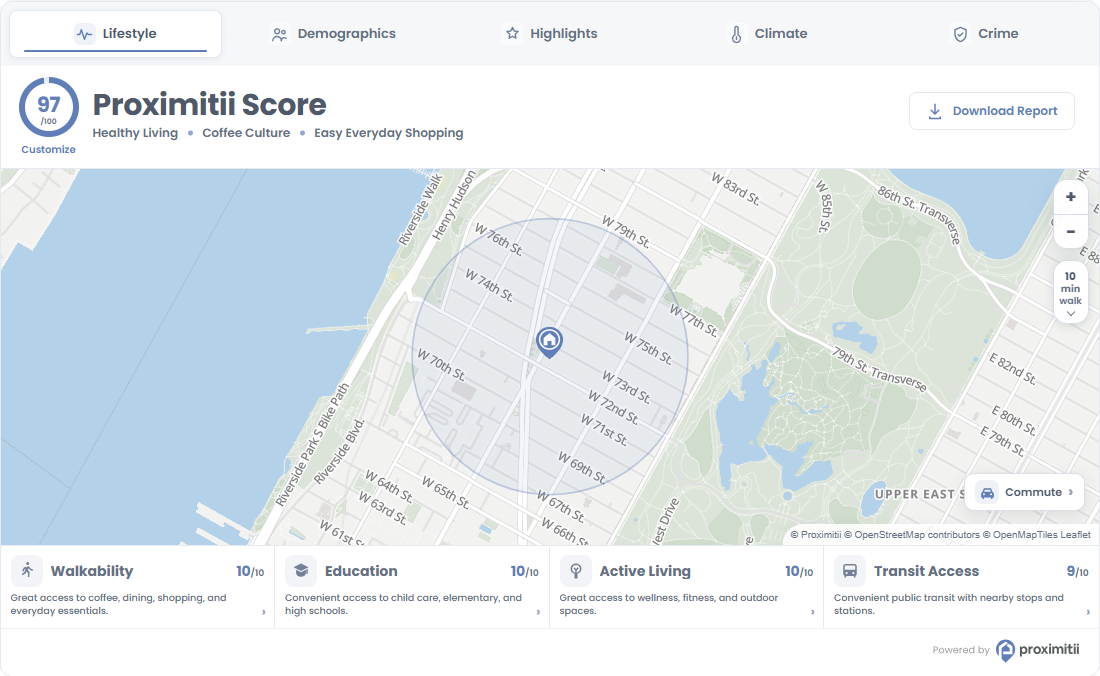
Installation
Add the following embed code to your page or template. Replace the widget key and coordinates with your own values.
<div id="prox-super-widget"></div>

<script src="https://widget.proximitii.com/v1/core/proximitii-widget.js?v=42"></script>

<script>
ProximitiiWidgets.superWidget({
  container: 'prox-super-widget',
  widgetKey: "PUT_YOUR_WIDGET_KEY_HERE",
  lat: 40.778832684988224,
  lon: -73.98103168840414
});
</script>
Always provide a valid widgetKey, lat, and lon. All other settings are optional and fall back to the defaults listed below.
Customization
The following Super Widget customization options are available.
General Options:
| Name | Description | Default Value | Accepted Values | Variable / Function |
|---|---|---|---|---|
| Container | The ID of the div where the widget renders. | N/A | Any valid element ID | container |
| Widget Key | Your public widget key. | N/A | Valid Proximitii widget key | widgetKey |
| Latitude | Sets the latitude of the center location. | N/A | Decimal between -90 and 90 | lat |
| Longitude | Sets the longitude of the center location. | N/A | Decimal between -180 and 180 | lon |
| Radius | Sets the local data search radius. | 500 | 100 to 6400 meters | radius |
| Country | Sets the country dataset. | us | us or ca | country |
| Language | Sets the widget language. | en | en or fr | language |
Included Sections:
| Name | Description | Default Value | Accepted Values | Variable / Function |
|---|---|---|---|---|
| Local Lifestyle | Shows or hides the Local Lifestyle tab. | true | true/false | sections.localLifestyle.enabled |
| Demographics | Shows or hides the Demographics tab. | true | true/false | sections.demographics.enabled |
| Community Highlights | Shows or hides the Community Highlights tab. | true | true/false | sections.communityHighlights.enabled |
| Crime | Shows or hides the Crime tab. | true | true/false | sections.crime.enabled |
Appearance and Map Options:
| Name | Description | Default Value | Accepted Values | Variable / Function |
|---|---|---|---|---|
| Show Border | Shows or hides the widget border. | true | true/false | showBorder |
| Primary Color | Sets the primary brand color. | #607eb8 | Hex color | primaryColor |
| Secondary Color | Sets the secondary panel/background color. | #f8fafc | Hex color | secondaryColor |
| Box Style | Controls the widget container styling. | shadow | shadow or flat | boxStyle |
| Font Family | Sets the widget font family. | Poppins, sans-serif | Any valid CSS font-family | fontFamily |
| Map Style | Sets the Proximitii map style. | light | light, bright, modern, baseline | mapStyle |
| Disable Gesture Handling | Disables scroll-wheel and gesture handling on the map. | false | true/false | disableGestureHandling |
The following Widget Settings apply to individual tabs through the sections object. Omitted values use these defaults.
Local Lifestyle Widget Settings:
| Name | Description | Default Value | Accepted Values | Variable / Function |
|---|---|---|---|---|
| Layout | Sets the tab layout. | bottom | bottom or left | sections.localLifestyle.layout |
| Score Title | Sets the score heading. | Proximitii Score | Text | sections.localLifestyle.scoreTitle |
| Font Size (px) | Sets the score heading size. | 30 | 10 to 50 pixels | sections.localLifestyle.scoreTitleFontSize |
| Maximum POIs | Limits places shown per category. | 16 | 5 to 25 | sections.localLifestyle.maxPoisPerCategory |
| Show Top Header | Shows or hides the top header. | true | true/false | sections.localLifestyle.showTopHeader |
| Show Proximitii Score | Shows or hides the overall score. | true | true/false | sections.localLifestyle.showProximitiiScore |
| Show Customize Link | Shows or hides the score customization link. | true | true/false | sections.localLifestyle.showCustomize |
| Show Highlights | Shows or hides the score highlights. | true | true/false | sections.localLifestyle.showHighlights |
| Show Main Category Scores | Shows or hides main category scores. | true | true/false | sections.localLifestyle.showMainCategoryScores |
| Show Subcategory Scores | Shows or hides subcategory scores. | true | true/false | sections.localLifestyle.showSubCategoryScores |
| Show Bottom Footer/Left Panel | Shows or hides the footer or left panel. | true | true/false | sections.localLifestyle.showBottomFooter |
| Show Commute | Shows or hides the commute control. | true | true/false | sections.localLifestyle.showCommuteButton |
| Show Walking-Distance Radius | Shows or hides the walking-distance radius. | true | true/false | sections.localLifestyle.showWalkingDistanceRadius |
| Main Categories | Selects the main score categories. A category is included only when it is selected and at least one of its subcategories is selected. | All four | Array of walkability, education, active-living, transit-access | sections.localLifestyle.categories |
| Subcategories | Selects the place and service types. | All twelve | Array of childcare, coffee, food, park, grocery, shop, entertainment, fitness, health, elem, high, transit | sections.localLifestyle.subcategories |
| Widget Height (px) | Sets the Local Lifestyle widget height. | 610 | 550 to 1000 pixels | sections.localLifestyle.widgetHeight |
| Default Zoom | Sets the map starting zoom. | 15 | 12 to 20 | sections.localLifestyle.defaultZoomLevel |
Demographics Widget Settings:
| Name | Description | Default Value | Accepted Values | Variable / Function |
|---|---|---|---|---|
| Title | Sets the tab heading. | Who Lives Here? | Text | sections.demographics.title |
| Subtitle | Sets the text below the heading. Use $radius for the formatted search radius. | Learn about the people, households, and lifestyles within a $radius radius. | Text | sections.demographics.description |
| Title Size (px) | Sets the heading size. | 30 | 10 to 50 pixels | sections.demographics.titleFontSize |
| Show Highlights | Shows or hides demographic highlights. | true | true/false | sections.demographics.showHighlights |
| Show Map | Shows or hides the demographics map. | false | true/false | sections.demographics.showMap |
| Show Map Pin | Shows or hides the map location pin. | true | true/false | sections.demographics.showPin |
| Categories | Selects the demographic tabs: Population, Economy, Households, Education, Languages, and Getting around. | All six | Array of people, economy, housing, education, diversity, commute | sections.demographics.categories |
| Map Height (px) | Sets the demographics map height. | 250px | 150px to 400px | sections.demographics.mapHeight |
Community Highlights Widget Settings:
| Name | Description | Default Value | Accepted Values | Variable / Function |
|---|---|---|---|---|
| General | ||||
| Title | Sets the tab heading. | Community Highlights | Text | sections.communityHighlights.title |
| Subtitle | Sets the text below the heading. Use $radius for the formatted search radius. | A quick look at what stands out within a $radius radius. | Text | sections.communityHighlights.description |
| Title Size (px) | Sets the heading size. | 30 | 10 to 50 pixels | sections.communityHighlights.titleFontSize |
| Layout | Selects two separate rows or one combined card section. | combined | combined or twoRows | sections.communityHighlights.layoutMode |
| Show Navigation | Shows or hides section navigation. | true | true/false | sections.communityHighlights.showNavigation |
| Show Scorecard | Shows or hides the scorecard section. | true | true/false | sections.communityHighlights.showTopSection |
| Show Highlights | Shows or hides the highlights section. | true | true/false | sections.communityHighlights.showHighlightsSection |
| Two Rows: Scorecard | ||||
| Section Title | Sets the scorecard heading. | Scorecard | Text | sections.communityHighlights.topTitle |
| Card Count | Limits scorecard cards. | 10 | 1 to 20 | sections.communityHighlights.topCardCount |
| Order | Sorts scorecards by score. | highest | highest or lowest | sections.communityHighlights.topOrder |
| Included Cards | Selects scorecard topics. | All ten | Array of walkability, shopping-essentials, transit-access, bike-access, schools, noise-level, local-economy, parks-recreation, neighbourhood-pace, community-feel | sections.communityHighlights.topSelectedCards |
| Show Scores | Shows or hides numeric scores on scorecards. | true | true/false | sections.communityHighlights.topShowScores |
| Show Descriptions | Shows or hides scorecard descriptions. | true | true/false | sections.communityHighlights.topShowDescriptions |
| Two Rows: Highlights | ||||
| Section Title | Sets the highlights heading. | Highlights | Text | sections.communityHighlights.highlightsTitle |
| Card Count | Limits highlight cards. | 10 | 1 to 20 | sections.communityHighlights.highlightCardCount |
| Selection | Chooses the strongest highlights or a random selection from the strongest. | strongest | strongest or randomStrongest | sections.communityHighlights.highlightSelection |
| Categories | Selects which highlight groups can appear. | All seven | Array of diningEntertainment, shoppingEssentials, recreation, education, mobility, economy, communityLifestyle | sections.communityHighlights.highlightCustomCategories |
| Minimum Score | Sets the minimum highlight score. | 6 | 0 to 10 | sections.communityHighlights.highlightMinimumScore |
| Show Named Place Cards | Includes cards for named places. | true | true/false | sections.communityHighlights.showNamedPoiCards |
| Show Demographic Cards | Includes demographic highlight cards. | true | true/false | sections.communityHighlights.showDemographicCards |
| Combined Layout | ||||
| Section Title | Sets the combined section heading. | Community Highlights | Text | sections.communityHighlights.combinedTitle |
| Card Count | Limits all combined cards. | 15 | 1 to 20 | sections.communityHighlights.combinedCardCount |
| Order | Sorts combined cards by score. | highest | highest or lowest | sections.communityHighlights.combinedOrder |
| Card Types | Selects which card types can appear. | All four | Array of communityScores, lifestyleHighlights, namedPlaces, demographicHighlights | sections.communityHighlights.combinedCardTypes |
| Max Score Cards | Limits score cards within the combined section. | 10 | 0 to 20 | sections.communityHighlights.combinedMaxScoreCards |
| Max POI Cards | Limits named place cards within the combined section. | 3 | 0 to 20 | sections.communityHighlights.combinedMaxNamedPoiCards |
| Show Scores | Shows or hides numeric scores on combined cards. | true | true/false | sections.communityHighlights.combinedShowScores |
Crime Widget Settings:
| Name | Description | Default Value | Accepted Values | Variable / Function |
|---|---|---|---|---|
| Title | Sets the tab heading. | Crime Risk Map | Text | sections.crime.title |
| Subtitle | Sets the text below the heading. | Explore nearby crime risk patterns from the selected location. | Text | sections.crime.description |
| Title Size (px) | Sets the heading size. | 30 | 10 to 50 pixels | sections.crime.titleFontSize |
| Map Height (px) | Sets the crime map height. | 550 | 550 to 1000 pixels | sections.crime.height |
| Default Zoom | Sets the crime map starting zoom. | 13 | 1 to 20 | sections.crime.zoomLevel |
| Show Pin | Shows or hides the location pin. | true | true/false | sections.crime.showPin |
| Show Crime Intensity Scale | Shows or hides the map intensity scale. | true | true/false | sections.crime.showCrimeIntensityScale |