
The Demographics Widget displays hyperlocal population, household, economy, education, diversity, commute, and map insights for a selected location and radius.
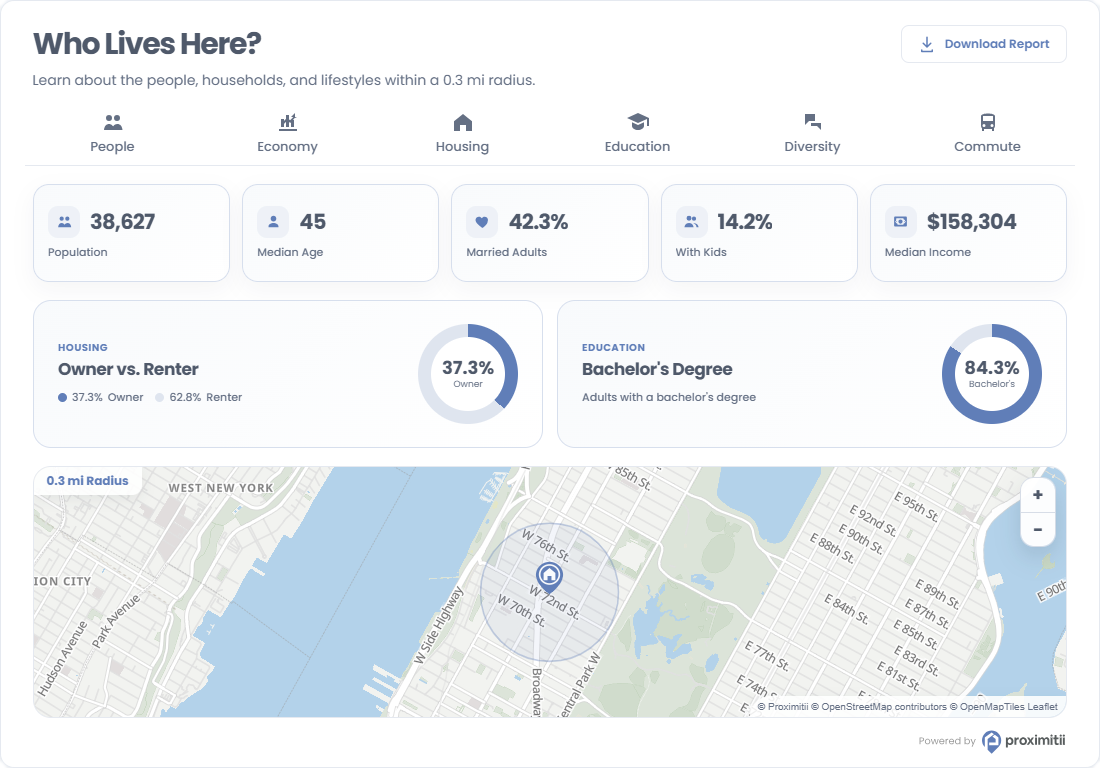
Installation
Add the following embed code to your page or template. Replace the widget key and coordinates with your own values.
<div id="prox-demographics"></div>

<script src="https://widget.proximitii.com/v1/core/proximitii-widget.js?v=35"></script>

<script>
ProximitiiWidgets.demographics({
  container: 'prox-demographics',
  widgetKey: "PUT_YOUR_WIDGET_KEY_HERE",
  lat: 40.778832684988224,
  lon: -73.98103168840414
});
</script>
Always provide a valid widgetKey, lat, and lon. All other settings are optional and fall back to the defaults listed below.
Customization
The following Demographics Widget customization options are available.
General Options:
| Name | Description | Default Value | Accepted Values | Variable / Function |
|---|---|---|---|---|
| Container | The ID of the div where the widget renders. | N/A | Any valid element ID | container |
| Widget Key | Your public widget key. | N/A | Valid Proximitii widget key | widgetKey |
| Latitude | Sets the latitude of the center location. | N/A | Decimal between -90 and 90 | lat |
| Longitude | Sets the longitude of the center location. | N/A | Decimal between -180 and 180 | lon |
| Radius | Sets the demographics search radius. | 500 | 100 to 6400 meters | radius |
| Country | Sets the country dataset. | us | us or ca | country |
| Language | Sets the widget language. | en | en or fr | language |
| Box Style | Controls the widget container styling. | shadow | shadow or flat | boxStyle |
Content Options:
| Name | Description | Default Value | Accepted Values | Variable / Function |
|---|---|---|---|---|
| Title | Sets the widget title. | Who Lives Here? | Any valid text | title |
| Title Font Size | Sets the title font size. | 30px | CSS size | titleFontSize |
| Description | Sets the text shown below the title. The $radius token is replaced with the selected radius. | Learn about the people, households, and lifestyles within a $radius radius. | Any valid text | description |
| Show Highlights | Shows or hides the highlights section. | true | true/false | showHighlights |
| Show Map | Shows or hides the map section. | true | true/false | showMap |
| Show Download Report | Shows or hides the download report button. | true | true/false | showDownloadReport |
| Show Pin | Shows or hides the location pin. | true | true/false | showPin |
Appearance Options:
| Name | Description | Default Value | Accepted Values | Variable / Function |
|---|---|---|---|---|
| Show Border | Shows or hides the widget border. | true | true/false | showBorder |
| Primary Color | Sets the primary brand color. | #607eb8 | Hex color | primaryColor |
| Secondary Color | Sets the secondary panel/background color. | #f8fafc | Hex color | secondaryColor |
| Font Family | Sets the widget font family. | Poppins, sans-serif | Any valid CSS font-family | fontFamily |
Map Options:
| Name | Description | Default Value | Accepted Values | Variable / Function |
|---|---|---|---|---|
| Map Height | Sets the map height. | 250px | CSS size | mapHeight |
| Map Style | Sets the Proximitii map style. | light | light, bright, modern, baseline | mapStyle |
| Disable Gesture Handling | Disables scroll-wheel and gesture handling on the map. | false | true/false | disableGestureHandling |
Categories
Use categories to select the Demographics Widget sections to display.
| Category Name | Variable | Individual Toggle |
|---|---|---|
| People | people | categoryPopulation |
| Economy | economy | categoryEconomy |
| Housing | housing | categoryHouseholds |
| Education | education | categoryEducation |
| Diversity | diversity | categoryLanguages |
| Commute | commute | categoryGettingAround |